
Senior Network Engineer focused on networking, security, and automation.
[My journey to CCIE Automation #1] Intro + building a Python CLI app
In this first post of my CCIE Automation journey, I take a hands-on approach to learning. I build a Python-based CLI tool using Click that connects to Cisco Catalyst Center, retrieves the physical network topology via a REST API, and visualizes it interactively using Pyvis. The goal is to combine theory with real, practical automation that is useful in a network engineer’s day-to-day work.
![<span id="hs_cos_wrapper_name" class="hs_cos_wrapper hs_cos_wrapper_meta_field hs_cos_wrapper_type_text" style="" data-hs-cos-general-type="meta_field" data-hs-cos-type="text" >[My journey to CCIE Automation #1] Intro + building a Python CLI app</span>](https://sicra.no/hs-fs/hubfs/two_guys_working_on_a_computer.jpg?width=1024&height=576&name=two_guys_working_on_a_computer.jpg)
(This article was originally published on Bluetree.no. Following the merger of Sicra and Bluetree, content from Bluetree has now been migrated to Sicra.)
My journey starts
Hi, I’m Bjørnar Lintvedt
I’m a Senior Network Consultant at Bluetree, working at the intersection of networking and software development.
I completed my bachelor’s degree in programming back in 2010, but early in my career I was pulled into the world of networking — and it stuck. From 2010 to 2016, I worked hands-on with network design and operations, while also building automation tools like an in-house network testing system.
Since 2016, I’ve helped clients design and operate network infrastructure while developing a custom network operations platform internally at Bluetree. That mix of infrastructure and code is what I truly enjoy.
Now, I’m pursuing the CCIE Automation certification — Cisco’s most advanced certification for network automation and programmability — and I’m sharing the journey here through hands-on blog posts like this one.
Why CCIE Automation?
Because it brings everything together:- Networking
- Automation
- Programming
- Infrastructure as Code
Planen min
-
A study plan from June through November
-
Aiming for 10–15 hours of weekly study — though with two small kids at home, it may vary!
-
Weekly focus on theory, labs, and review
-
Following the excellent on-demand training from ccie-automation.com — thanks Andreas Baekdahl !
-
Deltar i en studiegruppe
Blogging about it — for the first time
Writing about my technical journey isn’t something I usually do — but I’m genuinely excited to try.
This is a way to stay motivated, hold myself accountable, reflect, and hopefully connect with others on a similar path.
Blog updates
I’ll share detailed blog posts each week here at bluetree.no, including:
-
Key topics and how I study them
-
Ideas for applying the tech
-
What works — and what doesn’t
-
Progress updates and lessons learned
Blog #1
In my journey toward the CCIE Automation lab exam, I’m taking a hands-on approach:
For each blueprint topic I study, I aim to build a real tool or script that’s useful in the everyday life of a network engineer.
This time, I focused on Blueprint item 2.2: Build, manage, and operate a Python-based CLI application to use a REST API. As the project evolved, it ended up touching multiple blueprint topics — and became a genuinely useful tool in its own right.
I’ve also set up a GitLab repository where I’ll publish all my study-related code:
Link to my Github repository on CCIE Automation can be found here >
This blog’s tool: Python tool to visualize network topology from Catalyst center
The goal was to build a CLI tool that connects to Cisco Catalyst Center, retrieves physical topology data, and visualizes it in seconds.
- Built with click (python lib)
A powerful CLI framework that’s also listed on the exam software list. I explored several features: @click.group, @click.option, @pass_obj and @pass_context decorators, using them to pass user inputs cleanly into the tool. - Uses Cisco Catalyst Center’s REST API
I created a dedicated Python class to handle authentication, topology retrieval and parsing the data to a format that fits pyvis. I created a folder called “api” where I put the python file for this class, so it can be reused in future projects, and potentially add more API classes. - Visualizes the data with pyvis
Not on the exam list, but a fun and effective way to show the topology in a browser using interactive HTML/JavaScript topology. The drawing generated shows all the network devices and links. For each network devices it shows label with hostname, and if you hover it will show the model name. Color coding on the network devices is based on model name.
Here is the links to the main script and Catalyst API class.
Flow:
1. Created a main click group that will hold object state for network nodes and links.
2. First click command will authenticate with Catalyst Center, do API call to get physical topology, parse the data to pyvis friendly format and then store the data back to the shared context/object.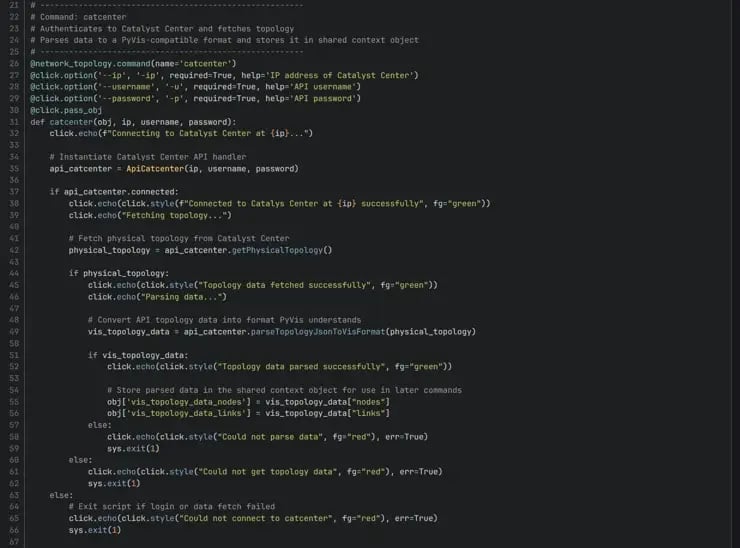
- You can also see that I instantiate a new object from the class ApiCatcenter. This will in the init-function connect to API and try to retrieve token that will be used for the get topology call later.
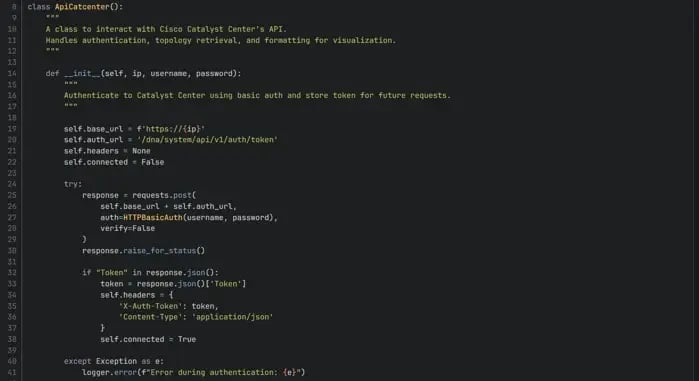
2. In the class there is a function to do the API call to get the topology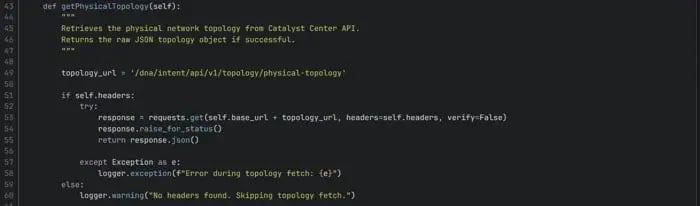
3. And the last function of the class parses the data in to a pyvis friendly format.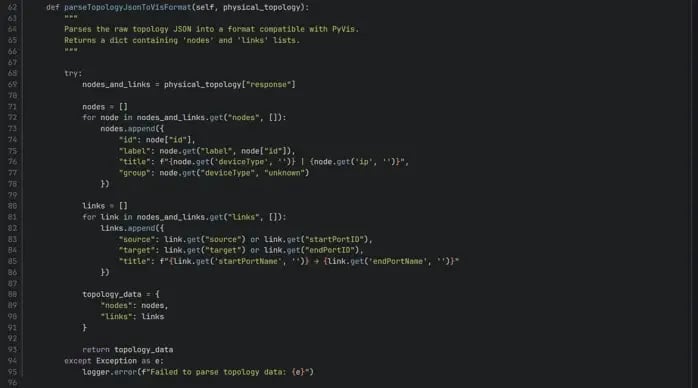
3. The second click command will get the shared object for nodes and link, and output the topology either as raw json or a pyvis topology drawing.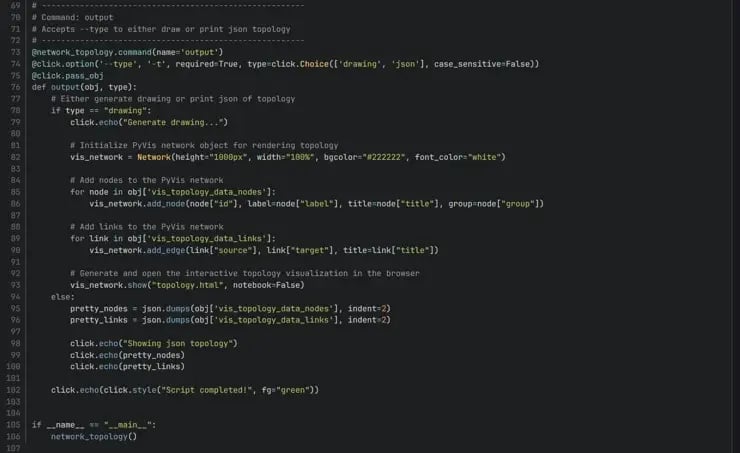
4. The output in all it's glory: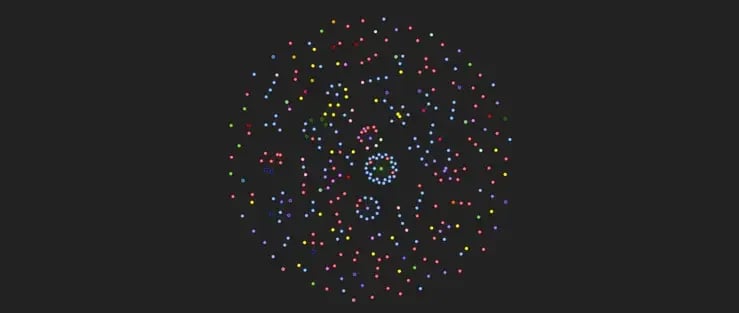
As you can see in this example output, not all network devices were connected to each other, but anyway looks nice I think!
Example usage: python3 network_topology.py catcenter -ip <ip_address> -u <username> -p <password> output -t <drawing | json>
Potential improvements
- Add new commands to support other products/API calls to get topology. E.g Cisco ACI, Cisco FMC etc. Then show the topology for all of them together.
- More precise error handling.
- Probably alot more!
Blueprint Items Touched
| Blueprint item | Description |
| 2.2 | Build, manage, and operate a Python-based CLI application to use a REST API |
| 2.3.a | Consume and use a new REST API, given the documentation |
| 3.1 | Create, modify, and troubleshoot scripts by using Python libraries and SDK documentation to automate against APIs (ACI, AppDynamics, Catalyst Center, FDM, Intersight, IOS XE, Meraki, NSO, Webex) |
It’s interesting how quickly a single project can connect with multiple areas of the blueprint — making this both practical and exam-relevant.
Reflections #1
-
Click was intuitive to use and offered built-in argument parsing, help text, and structure.
-
Catalyst Center’s API returned more data than I needed — parsing and reshaping the response was key (No pun intended).
-
pyvis made it fun to visualize the data interactively – I feel this can be used for a lot of fun in the coming months!
-
It was fun seeing how quickly multiple blueprint items were touched — not sure if every week will be like this, but it’s motivating!
What’s next?
Next time, I’ll continue in the same spirit and explore:
Blueprint item 2.1: Build, manage, and operate a Python-based REST API with a web application framework (endpoints, HTTP request and response, OpenAPI specification).
Useful Links
- GitLab Repo – My CCIE Automation Code
- click – Python CLI framework
- pyvis – Network Visualization in Python
- Cisco Catalyst Center API documentation
Blog series
-
[My journey to CCIE Automation #2] Inventory REST API and microservices architecture
-
[My journey to CCIE Automation #3] Orchestration API and NETCONF
-
[My journey to CCIE Automation #4] Automating network discovery and reports with Python and Ansible
-
[My journey to CCIE Automation #7] Exploring Model-Driven Telemetry for real-time network insights
-
[My journey to CCIE Automation #8] Exploring ThousandEyes and automating Enterprise Agent deployment
-
[My journey to CCIE Automation #9] Applying OWASP Secure Coding Practices
-
[My journey to CCIE Automation #10] From Docker Compose to Kubernetes
Explore more

Blog
Ten years. Ten stories from the front lines of cyberwarfare
Ten stories about how Sicra builds digital resilience against cyberattacks.

Blog
The future of cybersecurity: More regulation and three AI risks
Hedvig Moe on growing regulation and three AI risks shaping cybersecurity.
Blog
Cyberattackers use AI, so cyber defense needs AI too
Arctic Wolf on how AI is changing cyberattacks and how organizations can respond.

Blog
Gaute Lien: What makes organizations resilient to cyberattacks?
Gaute Lien on the security work that builds digital resilience.