
Senior Network Engineer focused on networking, security, and automation.
[My journey to CCIE Automation #3] Orchestration API and NETCONF
In blog #3 of the CCIE Automation journey, the focus is on NETCONF and YANG. An Orchestration API and a Python-based CLI tool are built to run NETCONF jobs across all devices in the inventory in a single flow.
![<span id="hs_cos_wrapper_name" class="hs_cos_wrapper hs_cos_wrapper_meta_field hs_cos_wrapper_type_text" style="" data-hs-cos-general-type="meta_field" data-hs-cos-type="text" >[My journey to CCIE Automation #3] Orchestration API and NETCONF</span>](https://sicra.no/hs-fs/hubfs/two_guys_working_on_a_computer.jpg?width=1024&height=576&name=two_guys_working_on_a_computer.jpg)
(This article was originally published on Bluetree.no. Following the merger of Sicra and Bluetree, content from Bluetree has now been migrated to Sicra.)
[My journey to CCIE Automation #3] Orchestration API and NETCONF is part of an ongoing series about my CCIE Automation journey. In the previous post, I built an Inventory REST API as a foundation for further automation. This time, I move on to NETCONF and build an Orchestration API to execute jobs against devices in the inventory.
Blog #3
This time has been all about getting deeper into NETCONF and YANG – two cornerstones of modern network automation.
NETCONF and ncclient
NETCONF is a protocol that lets you communicate with network devices over XML. Instead of pushing raw CLI commands, you send structured data in XML.
To work with it in Python, I used the ncclient library:
- It establishes a NETCONF session to the device
- Lets you perform operations like get, get-config, edit-config
- Uses XML payloads to push or retrieve configuration/state
YANG
YANG is the data modeling language that defines what kind of data you can send with NETCONF.
-
It describes device configuration and state in a structured way.
-
I familarized my self with Cisco Yang Suite, which is a tool that make it a bit easier to understand how Yang works.
-
To access specific parts of the model, you often use XPath queries. Think of it as a GPS coordinate inside the XML tree – so instead of digging through thousands of lines of config, you can just ask:
“Give me the interface description for GigabitEthernet0/0/0”
Orchestration Service + Automation script
Armed with this knowledge, I built a new Nautix service: Orchestration
Orchestration Service
-
A Flask app serving an Orchestration API.
-
API endpoints to create and list jobs
-
Jobs are stored in a database and immediately trigger a NETCONF operation with ncclient
This means I can now go from “devices in inventory” → to “execute NETCONF action” in one flow. Which brings me to a new automation script.
Run netconf job on all devices in inventory
A python Click tool that:
-
Takes XML path, NETCONF operation method, username, and password as parameters
-
Fetches all devices from the Inventory API
-
Creates jobs in the Orchestration API
Which pushes XML configs or retrieves data
-
Displays the results
Look into my GitLab repository for more details — I’ve tried to comment the code as best as I can.
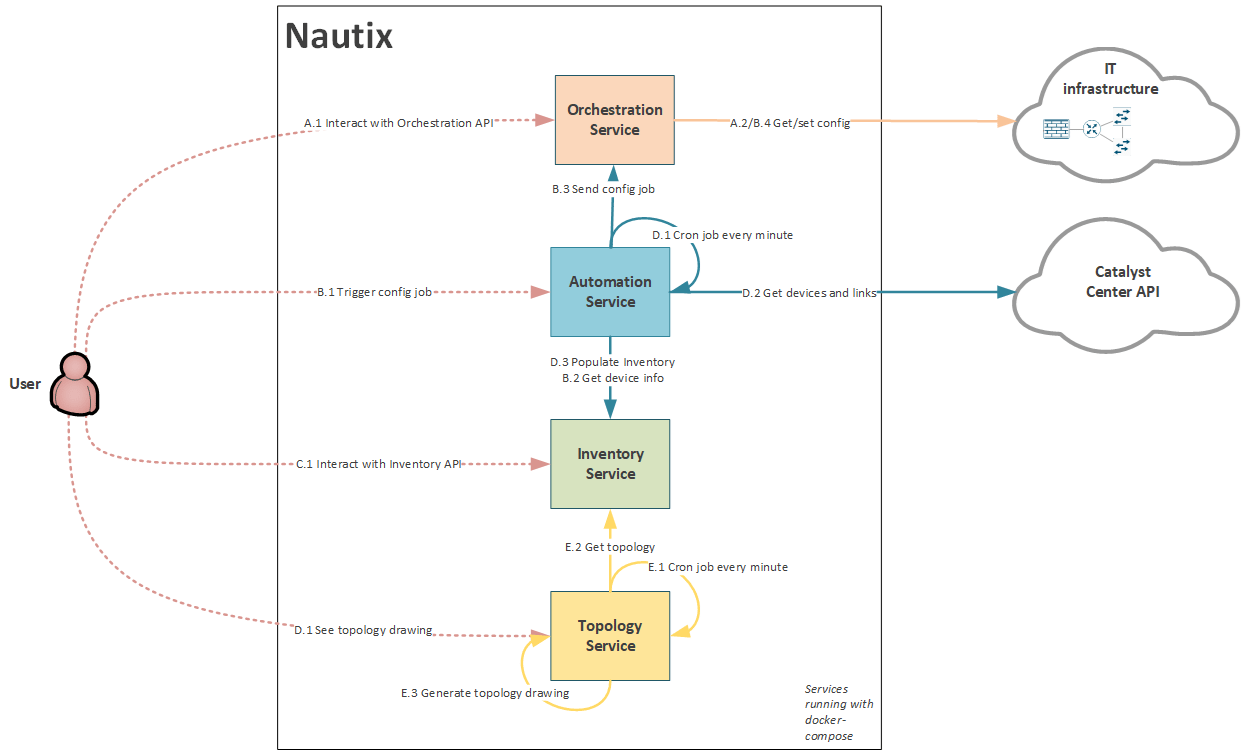
Service Interactions update
Since a new service is added, the Nautix diagram has also been updated:
Reflections #3
-
NETCONF and YANG were abstract at first, but working hands-on with ncclient and YANG Suite helped a lot.
-
There is for sure a lot of improvements to be made. But I have limited time, so it's best effort.
What’s next
In blog #4 I will focus on working with Ansible:
Blueprint item 2.7 Create and use a role by utilizing Ansible to manage infrastructure, given support documentation
2.7.a Loop control
2.7.b Conditionals
2.7.c Use of variables and templating
2.7.d Use of connection plug-ins such as network CLI, HTTPAPI, and NETCONF
Useful Links
Blog series
-
[My journey to CCIE Automation #1] Intro + building a Python CLI app
-
[My journey to CCIE Automation #2] Inventory REST API and microservices architecture
-
[My journey to CCIE Automation #4] Automating network discovery and reports with Python and Ansible
-
[My journey to CCIE Automation #7] Exploring Model-Driven Telemetry for real-time network insights
-
[My journey to CCIE Automation #8] Exploring ThousandEyes and automating Enterprise Agent deployment
-
[My journey to CCIE Automation #9] Applying OWASP Secure Coding Practices
-
[My journey to CCIE Automation #10] From Docker Compose to Kubernetes
Explore more

Blog
How to choose the right SOC services in 2026
Seven questions to ask before choosing a SOC service and managed SOC provider.

Blog
Sicra SOC strengthens your organization’s cybersecurity
Sicra Managed SOC monitors your IT environment around the clock and responds to cyber threats.

Blog
How Sicra SOC detects cyber threats
How Sicra SOC detects and responds to cyber threats before they cause significant damage.

Blog
Sicra’s first intern gets the opportunity to work closely with the leadership team
Oscar Dennett is Sicra’s first intern, working closely with company management.