In blog #2 of my CCIE Automation journey, the project takes a new direction. Instead of standalone tools, I am now building a modular application based on microservices, with an inventory REST API at its core. This week’s focus is on service architecture, Docker, and practical API development closely aligned with the CCIE Automation blueprint.
[My journey to CCIE Automation #2] Inventory REST API and microservices architecture
![<span id="hs_cos_wrapper_name" class="hs_cos_wrapper hs_cos_wrapper_meta_field hs_cos_wrapper_type_text" style="" data-hs-cos-general-type="meta_field" data-hs-cos-type="text" >[My journey to CCIE Automation #2] Inventory REST API and microservices architecture</span>](https://sicra.no/hs-fs/hubfs/two_guys_working_on_a_computer.jpg?width=1024&height=576&name=two_guys_working_on_a_computer.jpg)

(This article was originally published on Bluetree.no. Following the merger of Sicra and Bluetree, content from Bluetree has now been migrated to Sicra.)
[My journey to CCIE Automation #2] Inventory REST API and microservices architecture is part of a series documenting my CCIE Automation journey. In the first post, I introduced the study plan and built a Python CLI app. This time, I focus on building an Inventory REST API and establishing a microservices foundation.
Blog #2
This time marked a shift in direction. Instead of building isolated tools, I’ve started developing a larger app made up of multiple microservices, each tackling relevant topics from the blueprint.
Everything now runs in containers via Docker Compose, with an eventual move to Kubernetes in mind.
This new approach feels more practical, modular — and let’s be honest — more fun!
This time’s blueprint focus was:
-
2.1 Build, manage, and operate a Python-based REST API with a web application framework
Also touched on:
-
4.1 Create a Docker image (including Dockerfile)
-
4.2 Package and deploy a solution by using Docker Compose
This blog’s focus: Inventory API + service architecture
The main outcome this time was the creation of the Inventory API — now a standalone microservice forming the backbone of my app.
- Inventory service
Serves as a REST API for CRUD operations on device and link models. In addition you can get topology (all devices and links) in one separate API call.
Tech stack:
-
Flask + Flask-RESTx for the REST API and OpenAPI docs
-
Flask-SQLAlchemy for ORM and DB operations
-
SQLite as a lightweight starting point (with plans to move to Postgres maybe?)
-
Dockerfile to containerize the service
-
Docker Compose to orchestrate multiple services together
Refactoring blog #1 code into services
To move toward a modular microservice design, I’ve split the original Blog #1 scripts into two new dedicated services:
Automation service- Periodically (via cron job) fetches devices and links from Catalyst Center API
- Pushes the data into the Inventory API to keep the inventory updated
Topology service
- Periodically queries the Inventory API for current device and link data
- Generates network topology drawings, which is served through Nginx.
Service Interactions
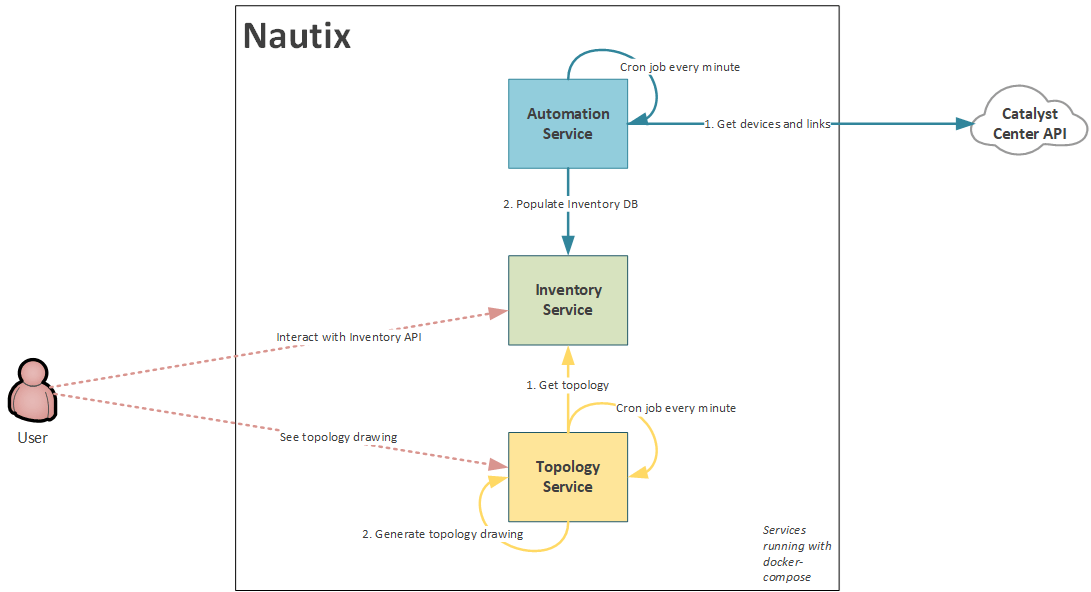
- Oh hey — did you spot that?
Yes, that’s right — the app now has a name: Nautix!
A mix of “network,” “automation,” and that irresistible -ix suffix that makes it sound like it does way more than it probably should. Also — let’s be honest — it sounds a bit naughty, which is fitting since the app probably won’t be production-ready anytime soon.
Modular & expandable architecture
This microservice model makes it easier to scale and align with the CCIE Automation blueprint:
- I’ll continue to build new services as I progress through the study plan — for example: orchestration service, health check service or telemetry services
- Existing services like Inventory, Automation, and Topology will be improved and extended with more advanced functionality as new blueprint topics are covered.
Reflections #2
-
I had no prior Flask experience, but my Django background made concepts like routing, models, and serialization feel familiar.
-
I really liked working with Flask-RESTx — it's light, intuitive, and gives you input validation and OpenAPI docs for free.
-
Docker Compose will now be the foundation for running all future services in this CCIE prep app
-
Creating persistent storage for SQLite in Docker was easier than expected using volume mounts.
- Running environment variables directly when running docker-compose command as a temp solution, until I get to the secrets management blueprint item.
- There are probably loads of improvement to be done, but for now, I'm happy with the progress this time
What's next (After summer vacation)
I’m now taking a short summer break, and will return to the CCIE Automation study plan in the last week of August. Blog #3 will focus entirely on working with NETCONF:
Blueprint item 2.4 Create a NETCONF payload based on a given YANG module, and interpret the response
Blueprint item 2.5 Create a NETCONF filter by using XPath
Blueprint item 2.6 Configure network devices on an existing infrastructure using NETCONF and YANG analysis tools
I’ve decided to focus only on NETCONF in Blog #3. Expect more microservices, XML, and YANG tools — and of course, more Docker
Useful links
GitLab-repo – min CCIE Automation-kode
Blog series
-
[My journey to CCIE Automation #1] Intro + building a Python CLI app
-
[My journey to CCIE Automation #3] Orchestration API and NETCONF
-
[My journey to CCIE Automation #4] Automating network discovery and reports with Python and Ansible
-
[My journey to CCIE Automation #7] Exploring Model-Driven Telemetry for real-time network insights
-
[My journey to CCIE Automation #8] Exploring ThousandEyes and automating Enterprise Agent deployment
-
[My journey to CCIE Automation #9] Applying OWASP Secure Coding Practices
-
[My journey to CCIE Automation #10] From Docker Compose to Kubernetes
Explore more

Blog
Ten years. Ten stories from the front lines of cyberwarfare
Ten stories about how Sicra builds digital resilience against cyberattacks.

Blog
The future of cybersecurity: More regulation and three AI risks
Hedvig Moe on growing regulation and three AI risks shaping cybersecurity.
Blog
Cyberattackers use AI, so cyber defense needs AI too
Arctic Wolf on how AI is changing cyberattacks and how organizations can respond.

Blog
Gaute Lien: What makes organizations resilient to cyberattacks?
Gaute Lien on the security work that builds digital resilience.