
Senior Network Engineer focused on networking, security, and automation.
[My journey to CCIE Automation #6] Automating Cisco ACI Deployments with Terraform, Vault, and GitLab CI
In blog #6 of the CCIE Automation journey, Terraform, Vault, and GitLab CI are used to automate Cisco ACI deployments. By combining infrastructure as code, secure secret management, and pipeline-driven orchestration, a repeatable and stateful approach to network provisioning is implemented.
![<span id="hs_cos_wrapper_name" class="hs_cos_wrapper hs_cos_wrapper_meta_field hs_cos_wrapper_type_text" style="" data-hs-cos-general-type="meta_field" data-hs-cos-type="text" >[My journey to CCIE Automation #6] Automating Cisco ACI Deployments with Terraform, Vault, and GitLab CI</span>](https://sicra.no/hs-fs/hubfs/two_guys_working_on_a_computer.jpg?width=1024&height=576&name=two_guys_working_on_a_computer.jpg)
(This article was originally published on Bluetree.no. Following the merger of Sicra and Bluetree, content from Bluetree has now been migrated to Sicra.)
[My journey to CCIE Automation #6] Automating Cisco ACI deployments with Terraform, Vault and GitLab CI is part of a series documenting my CCIE Automation journey. In the previous post, I worked with pipelines for network verification and deployment. In this post, I focus on automating Cisco ACI deployments using Terraform and Vault.
Blog #6
After working with pyATS and CI/CD in blog #5, I wanted to dive deeper into infrastructure as code using Terraform, and integrate it with GitLab CI.
This time I explored Terraform to deploy and manage Cisco ACI fabric resources in a stateful and repeatable way, and integrated Vault to manage secrets in my Nautix app.
Why Terraform?
Terraform allows us to describe infrastructure declaratively. It’s perfect for:
-
Managing ACI tenants, VRFs, and EPGs as code
-
Handling dependencies between resources automatically
-
Tracking state to know exactly what’s deployed
-
Using loops and variables for repeatable, parameterized deployments
-
Integrating secrets securely (Vault)
Instead of manually pushing configurations, Terraform lets your code understand and manage the network state.
Why Vault?
Vault provides a secure way to manage secrets and credentials in automation pipelines. In this project, it allows us to:
-
Store ACI usernames and passwords securely
-
Provide credentials dynamically to Terraform without hardcoding them
-
Rotate secrets easily without touching code
-
Control access to sensitive information per environment or service
Instead of storing credentials in .tfvars or Git, Vault makes sure secrets never leak and automation pipelines can safely access what they need.
The project in this post
I created a Terraform project to deploy ACI resources, integrated into GitLab CI:
-
Variables (aci.auto.tfvars) – Centralized definitions for tenants, VRFs, application profiles, and endpoint
-
GitLab CI (.gitlab-ci.yml) – Orchestrates Terraform runs in a pipeline.
-
Vault-tjeneste – Docker Compose file spins up Vault and other required services locally.
Pipeline flow:
1. The pipeline is triggered by creating a pipeline
- With the required JOB_METHOD and environment variables.
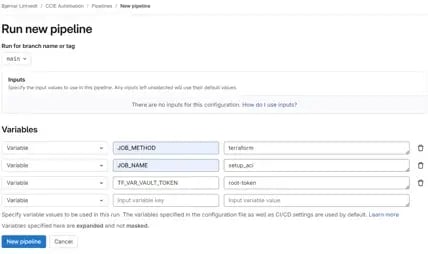
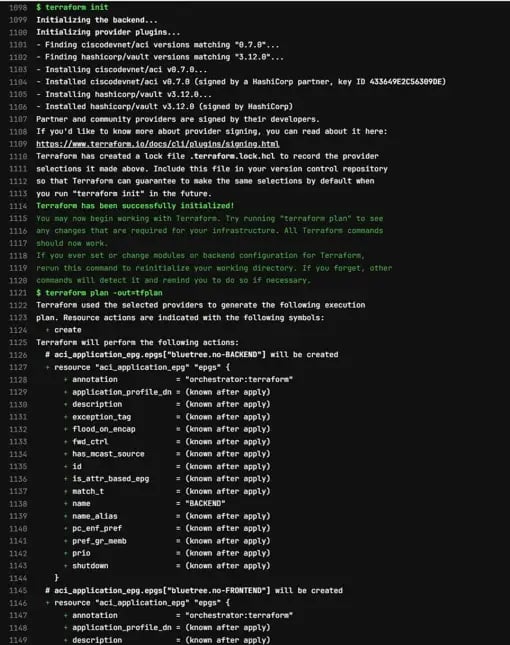
2. Terraform plan stage
-
Runs automatically if JOB_METHOD is set to "terraform"
-
Initializes Terraform
-
Generates a plan file (tfplan) showing what will be created or updated
3. Terraform deploy stage
-
Runs manually after verifying the plan
-
Applies the plan and provisions the Cisco ACI infrastructure
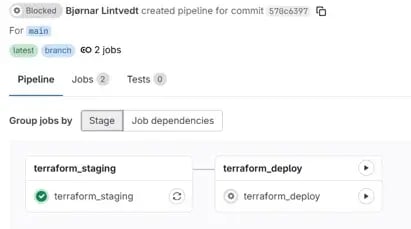
This staged approach ensures safe deployments and gives you an opportunity to review changes before they are applied.
Implementation
Here’s the folder structure:
pipelines/jobs/setup_aci/
-
main.tf – Terraform resources, loops, and dependencies
-
aci.auto.tfvars – Variables and credentials for ACI deployment
Also updated:
-
.gitlab-ci.yml – Orchestrates Terraform in CI/CD pipeline
-
docker-compose.yml – Spins up Vault and other services for local testing
How it works
Let’s break it down step by step.
1. GitLab CI
The .gitlab-ci.yml ties the workflow together and determines which stages run based on the JOB_METHOD variable.
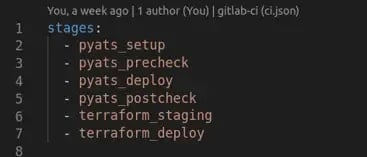
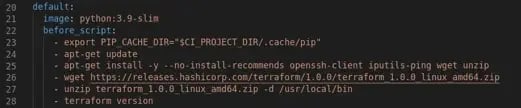
- Ensure that Terraform is installed in the Gitlab runner.
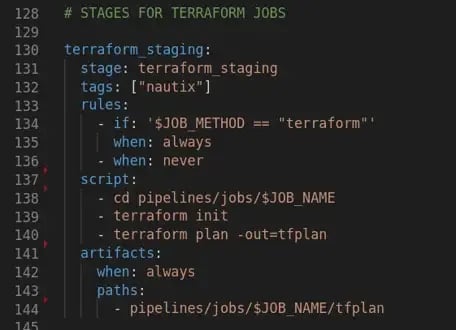
- The first stage runs automatically (terraform plan) and produces a plan file.
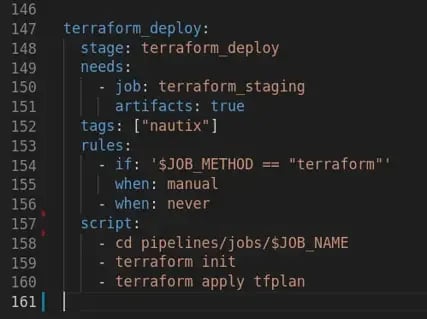
- The deploy stage (terraform apply) runs manually and provisions the ACI resources based on the plan.
2. Terraform
The project consists of main.tf and aci.auto.tfvars.
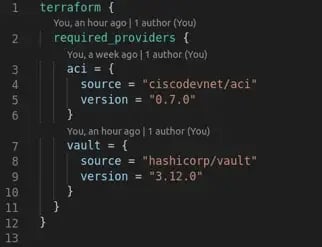
- Providers: Cisco ACI provider for resource creation and Vault provider for secure credentials.
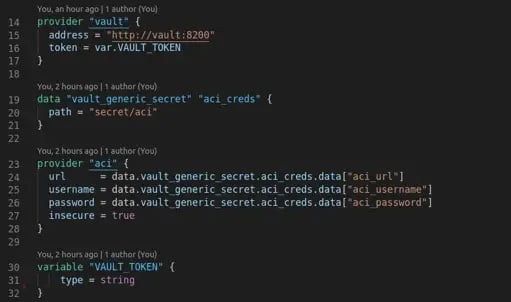
- Vault integration: Use VAULT_TOKEN environment variable (export TF_VAR_VAULT_TOKEN=root-token) to fetch secrets dynamically.
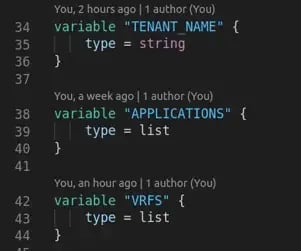
Variables:
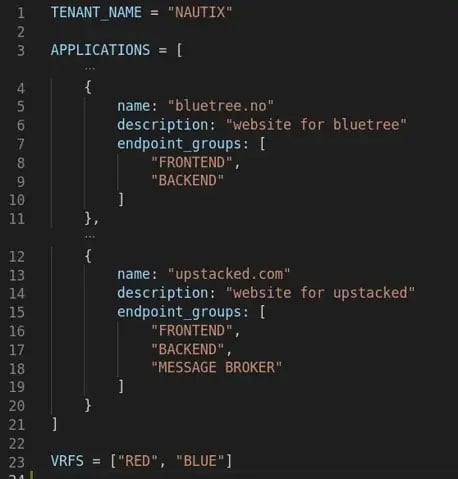
- TENANT_NAME – Name of the ACI tenant ("NAUTIX")
- APPLICATIONS – List of applications with names, descriptions, and endpoint groups
- VRFS – List of VRFs to create under the tenant (["RED", "BLUE"])
Tenant
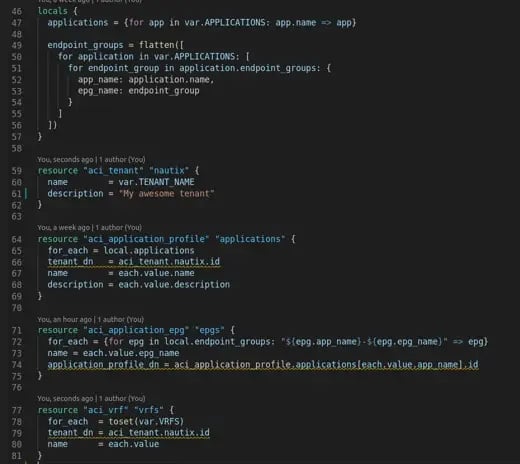
- Creates an ACI tenant with the name "NAUTIX".
-
Creates one application profile per application in the tenant.
- Uses the for_each loop so Terraform dynamically creates profiles for:
- bluetree.no
- upstacked.com
Endpoint groups
-
Creates EPGs for each application.
-
Loops through all endpoint_groups from locals.endpoint_groups.
- Uses a key combining app_name and epg_name to ensure unique map keys for for_each
VRFs
- Creates VRFs for the tenant, one for each name in VRFS.
-
Converts the list to a set to ensure unique entries.
3. Vault
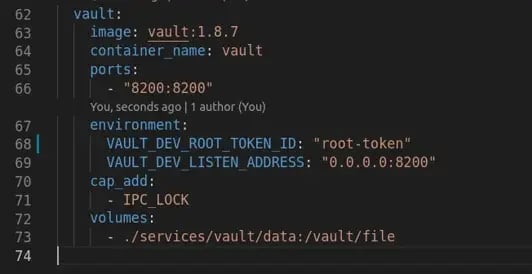
A new Vault service is added to the Docker Compose file to provide secure credentials to Nautix without exposing them in code.
Why this matters
Instead of manually configuring ACI:
-
Deployments are repeatable and version-controlled
-
Loops and variables make scaling easy
-
Secrets are protected with Vault
-
Dependencies between tenants, VRFs, and EPGs are automatically handled
-
Terraform and GitLab CI now manage infrastructure safely
Nautix architecture
.webp?width=1243&height=1246&name=image-png-Sep-18-2025-08-11-55-2259-AM%20(1).webp)
What's next
In blog #7 I will focus on Model-driven-telemetry:
Blueprint item 3.4 Design a model-driven telemetry solution based on given business and technical requirements by using gNMI dial-in, gRPC dial-out, and NETCONF dial-in
Blueprint item 3.5 Create YANG model-driven telemetry subscriptions
3.5.a Identify model elements and cadence
3.5.b On-change or event drive
3.5.c Optimize frequency
3.5.d Dial-out subscription
3.5.e Secure telemetry streams
3.5.f Confirm data transmission
3.5.g Identify network issues and make changes
Useful links
- GitLab Repo – My CCIE Automation Code
- Terraform documentation
- Terraform Cisco ACI provider documentation
- Vault documentation
Blog series
-
[My journey to CCIE Automation #1] Intro + building a Python CLI app
-
[My journey to CCIE Automation #2] Inventory REST API and microservices architecture
-
[My journey to CCIE Automation #3] Orchestration API and NETCONF
-
[My journey to CCIE Automation #4] Automating network discovery and reports with Python and Ansible
-
[My journey to CCIE Automation #7] Exploring Model-Driven Telemetry for real-time network insights
-
[My journey to CCIE Automation #8] Exploring ThousandEyes and automating Enterprise Agent deployment
-
[My journey to CCIE Automation #9] Applying OWASP Secure Coding Practices
-
[My journey to CCIE Automation #10] From Docker Compose to Kubernetes
Explore more

Blog
How to choose the right SOC services in 2026
Seven questions to ask before choosing a SOC service and managed SOC provider.

Blog
Sicra SOC strengthens your organization’s cybersecurity
Sicra Managed SOC monitors your IT environment around the clock and responds to cyber threats.

Blog
How Sicra SOC detects cyber threats
How Sicra SOC detects and responds to cyber threats before they cause significant damage.
Blog
Sicra’s first intern gets the opportunity to work closely with the leadership team
Oscar Dennett is Sicra’s first intern, working closely with company management.