Help, I have E5!
A survival guide to the security tooling you already pay for, but might not be using.


You just signed the invoice - it was significantly higher than last year. Maybe it was the need for Teams telephony that tipped you over, or perhaps it was the requirements for Power BI Pro. Whatever the reason: You now have Microsoft 365 E5 licenses, the "Rolls Royce" package.
But then comes the nagging feeling. Are you actually using the platform, or are you just running a very expensive version of Microsoft 365 E3?
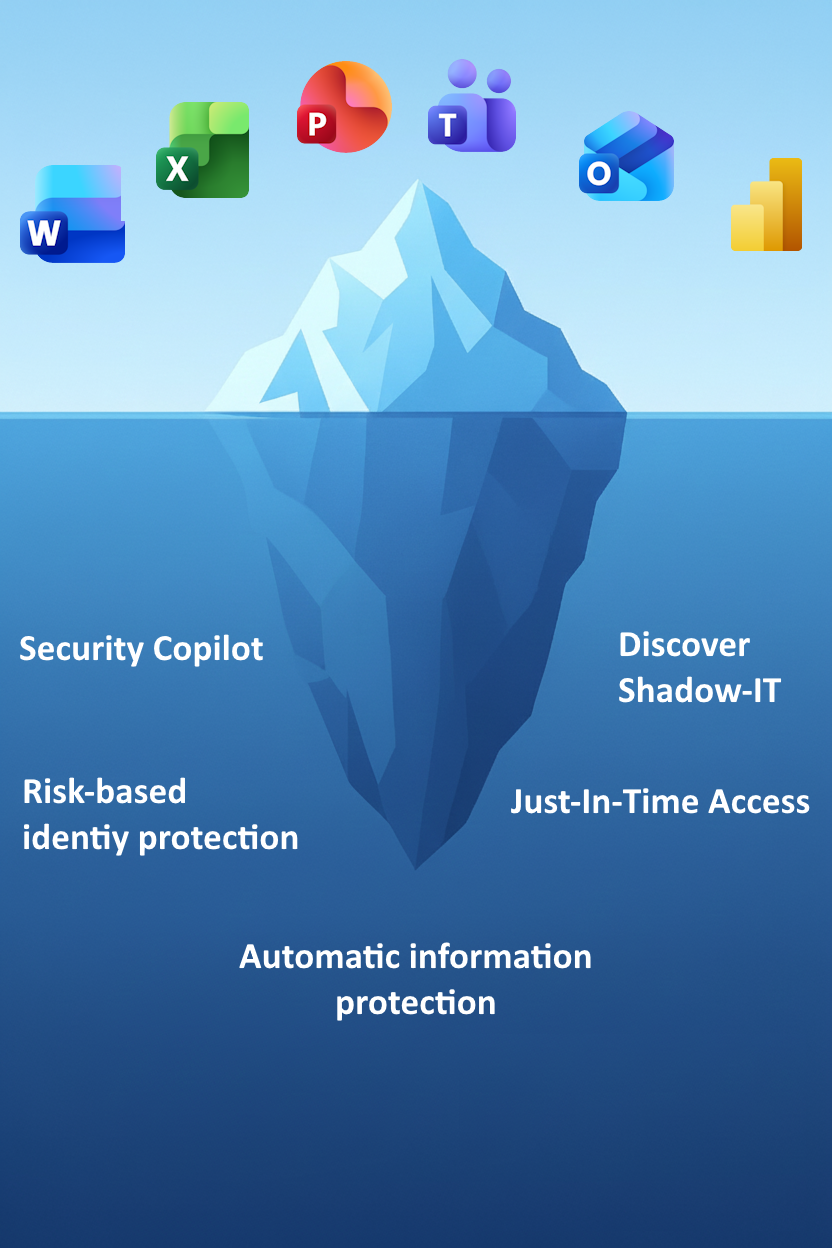
For many companies, upgrading to E5 is like buying a Formula 1 car to drive to the store. You use the Office apps, Exchange, and Teams, but leave the most powerful security engines sitting in the garage. This isn't just a waste of license money, it's a missed opportunity to elevate your security level from "good enough" to "leading."
In this article, we'll go through a few of the E5 features that are too often overlooked that can end up being the difference between a thwarted attack and a disaster.
Kill the permanent administrator (Privileged Identity Management)
In a classic E3 world, administrators have their privileges 24/7. If an admin account is compromised at 03:00 on a Sunday morning, the attacker has immediate access. With PIM, we turn the tables. No one is an admin all the time.
Why it's overlooked?
Many believe it's cumbersome to have to "request access."
Why you must use it?
It massively reduces the attack surface. A user requests admin access only when they need it, for a time-limited period (e.g., 2 hours) and perhaps with a requirement for additional MFA approval. "Just-in-time" access is the gold standard for identity security.
From static rules to real-time risk (Identity Protection)
You probably already have Conditional Access in place. Here you can control the use of MFA and other security measures like blocking outdated protocols. It's a good start, but it's also static.
With E5, you get access to Microsoft Entra Identity Protection. This system uses machine learning to analyze billions of signals daily. It can detect if a password is in a leak on the dark web, or if a login occurs from an anonymous IP address often used for attacks.
The overlooked potential:
Instead of rigid rules, you can create policies that say: "If the login risk is medium or high -> Require immediate password change." This elevates the quality of your defense against sophisticated identity attacks.
Control over access
Managing access is crucial for security and compliance. Two tools in Microsoft Entra make this easier: Lifecycle Workflows and Access Reviews.
Lifecycle Workflows automates tasks related to identity throughout the employee journey. When someone starts, changes roles, or leaves, workflows ensure that access is automatically updated. This reduces manual work, minimizes errors, and ensures that permissions always align with current responsibilities.
Access Reviews provide an additional layer of control. Over time, employees can accumulate access they no longer need. Access Reviews allow managers to regularly confirm whether users should still have their permissions. This prevents "permission creep" and ensures compliance with internal policies and regulations.
Together, these tools provide a proactive approach:
- Lifecycle Workflows handle routine changes automatically.
- Access Reviews provide periodic checks for accuracy.
The result? A secure and efficient process that reduces risk, supports compliance, and ensures employees have the right access – neither more nor less.
By combining automation with human control, organizations can reduce security gaps, simplify audits, and build trust in their digital environment.
The largest attack surface is often through collaboration (Defender for Office)
We can't avoid the fact that email and Teams are critical collaboration surfaces for all organizations – and that they are also vulnerable to phishing attacks. Capabilities such as Conditional Access can help reduce risk and stop attacks, but with E5 you also get Defender for Office plan 1 and 2 included, which protects everything within Office 365. This includes Outlook, Teams, and SharePoint.
Defender for Office 365 gives us the ability to configure policies for Safe Links, Safe Attachments, and anti-phishing along with Microsoft's own dynamic threat protection and zero-hour auto purge (ZAP) that automatically removes reported or suspicious emails.
We also get the ability to set up Attack Simulation Training to run our own phishing tests as part of the package.
Protect the endpoints (Defender for Endpoint)
From email, the path quickly leads to endpoints. This is where malware and infostealers run to establish persistence and steal company information. E5 includes Defender for Endpoint plan 2 for one device per user. This gives us good telemetry in Defender XDR (Microsoft's security platform), but also active endpoint protection.
Make sure you've enabled Cloud Protection functionality and configured Defender for Endpoint beyond the standard settings. To activate Cloud Protection, you must ensure that Cloud Block Mode and Cloud Block Timeout are configured. This lets you determine how strict to be and how long to examine files downloaded before they run. Additionally, we must upload excerpts from malware files to Microsoft to have Cloud Protection activated.
Get control of the shadows (Defender for Cloud Apps)
Do you actually know where your company's data is located? Are employees using Dropbox, WeTransfer, or online PDF converters that you've never approved?
Many think Defender for Cloud Apps (formerly MCAS) is just a log. In reality, it's your "Cloud Access Security Broker" (CASB).
Why you need it?
Discovery: See which apps are actually being used in your network (Shadow IT). Defender for Cloud Apps can use Defender for Endpoint as a sensor to discover new applications. In Cloud Discovery, you can also create your own policies that alert you when new applications are discovered, and you can configure Defender for Endpoint to block unwanted applications. This requires enrolling the client in Intune or another form of management so it connects to the company's Defender.
Session Control: You can allow employees to use a personal PC to read email in webmail, but block downloading attachments. This is a feature that alone can justify the price of E5 if you have a BYOD strategy (Bring Your Own Device).
Automation of data classification
In E3, you may have experimented with manual labels (Information Protection labels). The problem? Users forget to mark documents, or they mark incorrectly.
E5 unlocks automatic classification.
The system can scan OneDrive, SharePoint, and email for sensitive information (social security numbers, credit cards, internal codenames) and automatically encrypt the file without the user lifting a finger. It removes the human error factor from data protection.
Leveraging AI capacity and data flow in XDR
For organizations with full E5 (not just the E5 Security add-on), there's a significant infrastructure ready for both AI automation and more cost-effective security monitoring. These are resources that often remain unused because people aren't aware of how the licensing model has changed.
Secure Compute Units are included
A common barrier to adopting Copilot Studio for process automation is uncertainty around consumption-based pricing for compute.
What many overlook is that the Full E5 license now includes a quota of Secure Compute Units (SCU). This means in practice that the organization can build and run autonomous agents in Copilot Studio without incurring ongoing extra costs for runtime. For those who already have the license, this means you can go from simple chat queries to actual automated workflows without waiting for new budget approvals.
Microsoft 365 E5 includes 400 SCU per 1000 E5 licenses. If you have fewer than 1000 E5 licenses, e.g., 100, you will get 40 SCU included.
Cost efficiency in Sentinel and XDR
Security logging is one of the biggest cost drivers in a modern SOC (Security Operation Center). Here, the E5 license provides two technical advantages that directly impact the operational budget for monitoring:
Data Grants for Sentinel: E5 provides a deduction quota (data grant) for data ingested into Microsoft Sentinel. This reduces the cost of lifting data from the Microsoft 365 environment into the SIEM solution.
Data in Defender XDR: Even more important is the data you don't have to move. Defender XDR includes storage of large amounts of raw data and telemetry at no extra cost. During 2026, Microsoft Sentinel will have moved completely into the Defender XDR portal, which means you can use data from XDR and Sentinel cross-platform – without paying dearly to move data over to Sentinel.
The prerequisite for Automatic Attack Disruption
The value of these "free" logs in Defender XDR isn't just storage, but that they feed Microsoft's detection engines.
When data from endpoints, identity, email, and cloud applications is available in the same data lake, the Automatic Attack Disruption functionality is activated. This allows the XDR engine to correlate signals across domains with high accuracy.
During ongoing attacks, such as Human Operated Ransomware or BEC (Business Email Compromise), the system can automatically isolate devices and disable user accounts in real-time.
A new feature from Microsoft Ignite in 2025 is also that the ability for Predictive Shielding is included, meaning the ability for Defender XDR to stop attacks proactively by shutting down attack paths before they are exploited.
Conclusion: Don't bite off everything at once
Having E5 can feel overwhelming. It's easy to get "analysis paralysis" from all the possibilities. But remember: You don't need to turn everything on tomorrow.
Start with identity. Get control of admin access with PIM. Then look at risk-based rules.
Explore more
.jpg?width=292&height=365&name=Sicra_office_3076%20(1).jpg)
Digital sovereignty must be measured in recovery time, not by the flag on the vendor’s website

How to choose the right SOC services in 2026

Sicra SOC strengthens your organization’s cybersecurity