Cost reduction in Microsoft Sentinel and Defender XDR
Concrete measures to lower cloud costs.

A "necessary" cost
Security and security monitoring is not a cheap affair – especially in the cloud. A cloud-based SIEM is often easy to start with, but many people find that the cost of logging often exceeds expectations. It's often a heavy camel to swallow, as security logs are necessary for both monitoring and detection, as well as other purposes such as threat hunting, incident response, and compliance.
Microsoft Sentinel and logging
Microsoft Sentinel is a great example of a cloud-based SIEM that's easy to get started with. Once the solution arrived, it did most of the work of pulling in the logs and indexing them for you – you just had to pay. The logs used for active search and alerting are called "analytic tier logs". This is what Microsoft refers to as "primary security data", data that should be actively used and has high demands for speed and functionality.
These logs also cost a lot. In Norway, you usually calculate around NOK 60 per GB if you are in a Norwegian data center. When the log volumes become large, there are quickly large costs as well. In addition, the logs often have a certain lifespan requirement, both while they are actively used and how long they should be available at all.
Microsoft Sentinel comes standard with a 30-day lifetime in the analytic tier, with no standard archiving. It includes up to 90 days of lifetime in the analytic tier at no extra cost, you just must remember to configure it. If you want to store data beyond 90 days, you must pay extra, whether it is hot or cold storage.
Defender XDR and logging
In Defender XDR, data is sent from the tools in the Defender portfolio, including Defender for Endpoint, Office, and Identity. The logs are collected and delivered for 30 days included in the license. Previously, you had to send the logs over to Microsoft Sentinel via "log streaming", which cost the standard ingestion cost in Microsoft Sentinel. Due to its volume, this was not very widespread as the costs associated with it were too high.
A new hope
The solutions for storing data for a longer period of time have long been limited to archiving directly in Sentinel or exporting, then to Azure Data Explorer or Storage Account. All of the solutions are complicated in their own way, but none was a full-fledged solution where the data was usable, the cost was relatively low and there was relatively low complexity in setup and operation.
That has changed. In 2025, Microsoft first introduced "Unified Experience," where Microsoft Sentinel and Defender XDR connect in the Defender portal. This allowed us to eventually search data across Defender and Sentinel – without streaming the data. This is already extremely cost-saving.
It's a little easier with Data Lake
In addition, Microsoft introduced a new extension of Sentinel, namely Sentinel Data Lake. Here you can send structured and unstructured data for storage for up to 12 years at an extremely reduced price compared to the analytic tier. The logs that are sent to the data lake are called the "data lake tier". These logs can be sent to Microsoft in any supported way, and one simply changes the type of log directly in the Defender portal to transition from the analytic tier to the data lake tier.
The cost per GB is about 2 kroner (varies depending on how many GB of data you search). This means that it is more optimal to create good, precise searches over searching broadly when working towards the data lake tier, as the cost is determined by the amount of data the search returns.
A simple calculation
The calculation becomes simple if you look at firewall logs, for example. This is a typical "noisy" log source, where there is a lot of data and little pure detection value in the data. However, it is a log source that is important for the whole picture, and parts of the data can be critical for good detection. If you send all the data (let's say 10 GB per day) to the analytic tier, it costs us about 600 NOK daily, while it becomes 20 NOK a day in the data lake tier.
If we imagine that we still send around 1 GB of data a day up from the data lake tier to the analytic tier and it costs us around 60 NOK a day, there is still a lot of money to be saved. Over a month there is a saving of around 15000 NOK, down from a full price in the analytic tier of 18000 NOK.
Of course, there is somewhat less functionality in the data lake tier, for example, you cannot create detection on the data and you do not have full support for Kusto (Microsoft's search language). In addition, you have to pay a low price to search, but the area of use is also intended for what Microsoft considers "secondary security data" – i.e. data that is not used directly in detection or threat hunting.
Simplified forwarding from XDR-tables
There are a lot of savings opportunities here, and you also have the option to send selected data up from the "data lake tier" to the "analytic tier". Either way, the recommendation here is clear – adopt the data lake and make active choices for your log sources.
One thing that has recently become possible is to send certain XDR tables, i.e. data from the Defender tools, directly to the "data lake tier" without paying for "streaming". You get full 30 days of Advanced Hunting detection and threat hunting support through the Defender portal, as well as being able to store the data for up to 12 years at a relatively low price. A real "best of both worlds".
It doesn't have to be expensive to be good
More data is not always the best. Experience indicates that a lot of data remains unused directly for detection and could have been processed differently. This also applies at a lower level, when we do not look directly at the data source, but the data itself. Maybe a table with data contains 20 fields, but we only use four of them. Then you have more opportunities to filter out these extra fields.
Perhaps the best example of this in practice is Windows Event Logging from servers and the built-in data connector in Microsoft Sentinel. Every single event that is broadcast contains a separate field, which contains the entire event in raw format - so you get the same data twice. If you filter out this field, you can in theory reduce the cost of a log source by up to 50%.
The chicken and the egg
It is easy to say that more data is always better, but then you have often not calculated the cost and budget. We must be pragmatic and smart – we can't think "what are we going to do with all this data we collect?" and instead think "we have to protect ourselves from this, what kind of data do we need?"
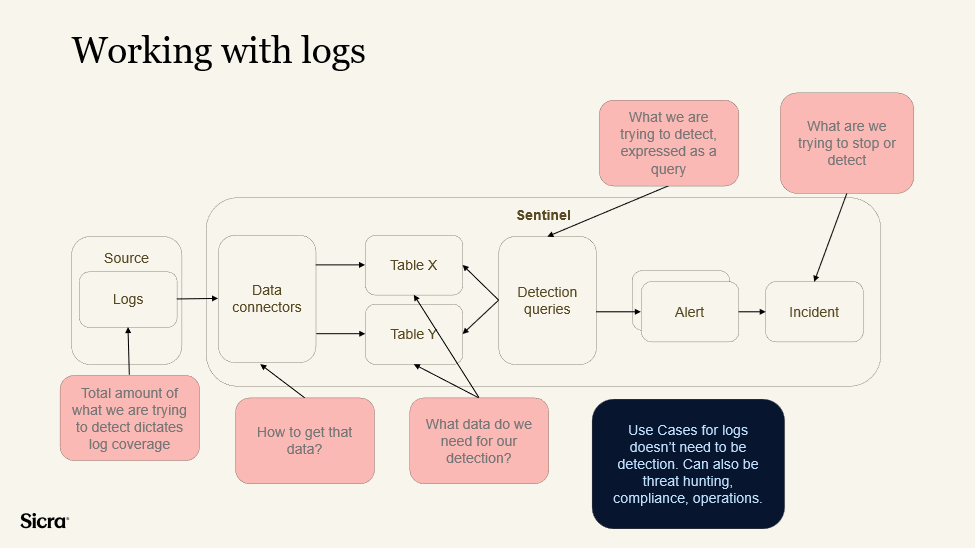
We need to start with identifying what we are trying to detect or stop from happening. In the graph above you can see a normal flow from the data source all the way to an incident. The idea is to think about what these incidents should be, based on what we are trying to protect, and then reverse engineer that into a query.
Always start with what events, problems or hypothetical scenarios you want to achieve or detect, and work from there towards what kind of query that would require and what data should be collected from where for the query to work.
What you can do now
- Adopt the Sentinel Data Lake and have clear opinions about which sources are primary and secondary security data.
- Filter the logs by what kind of data you use and make sure to look at the extent of which you utilize the data you have.
Many organizations have data lying around that could be better utilized for improved security, but many also have an unnecessary amount of data lying around in expensive table types that is not utilized. Make active choices about your data, it saves you a lot of money in the long run while improving your security for the better.
Explore more

How to choose the right SOC services in 2026

Sicra SOC strengthens your organization’s cybersecurity

How Sicra SOC detects cyber threats